
The short answer
- Shared folders you've joined count toward your Dropbox space, even though someone else owns them. This is the most common reason Dropbox looks full when your own files are small.
- Deleted files and version history don't count, so clearing Deleted files won't free anything.
- Over the limit on Dropbox Basic, files stop syncing and uploading. Stay over long enough and Dropbox starts removing your oldest files, after email warnings.
- The fastest fixes are leaving shared folders you don't need, removing duplicates, and moving big folders to another service.
Dropbox Basic gives you 2 GB, and it fills up faster than you’d think. When it does, Dropbox stops syncing, and the files taking up the space aren’t always the ones you’d guess. Here’s what counts, what doesn’t, and how to get back under your limit.
First, check which kind of “full” you have
- Your Dropbox space is full. Dropbox emails you, files stop syncing and uploads fail. That’s what this post is about.
- Your device is full. “Device storage is full” means the disk on your computer or phone has run out, not your Dropbox. In the Dropbox app, right-click big folders and make them online-only. They stay in Dropbox but stop taking up room on your disk.
To see how much Dropbox space you’re using, sign in at dropbox.com, click your avatar, open Settings and go to the Plan tab.
What counts toward your Dropbox space
| Counts | Doesn’t count |
|---|---|
| Every file you own, in any folder | Files in Deleted files |
| Shared folders you’ve joined, even if someone else owns them | Older versions of your files (version history) |
| Camera uploads and computer backups saved to your Dropbox | Files someone sent you with a link you didn’t add to your Dropbox |
The shared-folder rule is the one that catches people out. Join a colleague’s 1.5 GB project folder and your 2 GB Dropbox is three-quarters full, even though none of those files are yours. The exception is when you and the owner are on the same Dropbox team or Family plan, where a shared folder only counts once.
Six ways to free up Dropbox space
1. Leave shared folders you don’t need
On dropbox.com, open Shared, find folders you no longer use, and leave them. The space is freed for you straight away, and nobody else loses anything. If you need just a few files from the folder, copy those into your own folder first.
2. Remove duplicate files
Duplicates pile up from camera uploads on more than one phone, files saved twice from email, and “conflicted copy” files created when the same file is changed in two places at once. Our guide to finding duplicate files in Dropbox covers Dropbox’s own tool on paid plans and how to check on Basic.
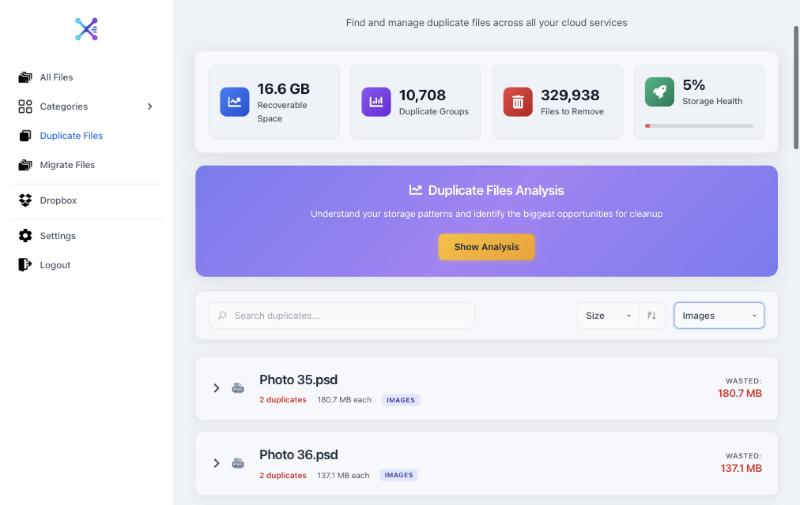
Axclaim’s free plan also scans Dropbox. It groups identical files using the content hash Dropbox keeps for each file, so copies are found even when their names are different, and it shows how much space each group wastes.
3. Find your biggest files
Videos, design files and old backups usually take up most of a Dropbox. Go through the folders where you keep them, check the file sizes, and decide what really needs to stay.
4. Check camera uploads and computer backups
If camera uploads are on, every photo and video from your phone lands in Dropbox. Computer backups do the same for folders like Desktop and Documents. Both are easy ways to fill 2 GB without noticing. Turn off the ones you don’t need and move older photos somewhere else.
5. Move big folders to another service
Free plans elsewhere are bigger: 5 GB on OneDrive, 10 GB on Box and 15 GB on Google (shared with Gmail and Google Photos). Moving a large folder of photos or videos to one of them can free most of your Dropbox. Our guide to moving files between cloud storage services shows three ways to do it.
6. Get more space
Dropbox gives Basic users extra space for each friend who joins through their referral link, and paid plans start at much larger amounts. If Dropbox is where you keep everything, upgrading may be simpler than constantly cleaning up.
If you stay over the limit
Dropbox’s help center is clear about what happens on Basic. Over your limit, you may not be able to sync, upload, share, move or preview files. If you stay over, Dropbox sends warnings and then removes files you own, starting with the ones edited longest ago. Files you’ve already downloaded to a device stay there, and deleted files can be restored from Deleted files for 30 days.
So it’s worth fixing before the warnings turn into deletions. Leaving one unused shared folder is often enough to get back under 2 GB.
Frequently asked questions
Why is my Dropbox full when I have hardly any files?
Shared folders you've joined count toward your space as if they were yours, unless you're on the same team or Family plan as the folder's owner. Check the shared folders in your Dropbox first.
Do deleted files count toward my Dropbox storage?
No. Dropbox says deleted files and version history don't count toward your storage, so there's nothing to gain from clearing them.
What happens if I stay over my Dropbox storage limit?
On Dropbox Basic you may not be able to sync, upload, share, move or preview files. If you stay over, Dropbox emails you and then removes files you own, starting with the ones edited longest ago. Deleted files can be restored for 30 days.
Does leaving a shared folder delete it for everyone else?
No. Leaving removes the folder from your Dropbox and frees the space it took up for you. The owner and other members keep their access.
What does "Dropbox device storage is full" mean?
That message is about the disk on your computer or phone, not your Dropbox space. Making files online-only in the Dropbox app frees disk space without deleting anything from Dropbox.
See what's filling your Dropbox
Connect Dropbox to Axclaim's free plan to see your files sorted into categories and your 10 biggest duplicate groups. No credit card required.