
The short answer
- Google Drive doesn't have a built-in duplicate finder.
- Quick manual checks are searching for "Copy of" and "(1)", and sorting files by size on the Storage page.
- Drive stores a checksum for every uploaded file, so a tool that reads it can find identical files even when their names differ. Axclaim does this on its Premium plan.
- Deleted duplicates still count toward your storage until the trash is emptied or 30 days pass.
Google Drive will happily store the same file five times. It has no duplicate finder, and the way it handles uploads makes copies easy to create without noticing. Here’s how to find them, from a two-minute manual check to a full scan.
Where duplicates in Google Drive come from
- Making copies. Make a copy gives you a file named “Copy of …”, and it’s easy to forget to delete the original.
- Uploading the same file again. When you upload a file with the same name into the same folder, Drive normally saves it as a new version of the existing file. If you pick “Keep both files”, you get two files with the same name.
- Syncing from more than one computer. Google Drive for desktop on two machines with overlapping folders can upload the same files twice.
- Re-uploading downloads. Files you downloaded and uploaded again often end in “(1)” or “(2)”, because that’s how browsers name repeat downloads.
Method 1: Search for copy names
In the search box at drive.google.com, try:
Copy ofto find copies made with Make a copy.(1)and(2)to find re-uploaded downloads.- The name of a file you suspect is duplicated, to see every copy in one list.
Open the matches, check which one you want to keep, and move the others to the trash.
Method 2: Sort your files by size
Click Storage in the left menu at drive.google.com. Drive lists every file you own from largest to smallest. Copies of the same file have the same size, so they tend to sit next to each other. This is the quickest way to find the copies that waste the most space.
Two files of the same size aren’t always the same file, so open both before you delete either.
Method 3: Use Google Drive for desktop and a duplicate finder
If you use Google Drive for desktop, you can point a desktop duplicate finder (dupeGuru is a free, open-source one) at your Google Drive folder.
- Use Mirror files mode, where Drive keeps a full copy of your files on your computer. In Stream files mode, scanning makes Drive download every file first.
- Deleting locally deletes in Drive. Anything you delete from the Google Drive folder goes to your Drive trash too.
- Expect it to take a while for a large Drive, because every file has to be read from your disk.
Method 4: Use a tool that reads Drive’s checksums
For every file you upload, Google Drive keeps a checksum: a short code calculated from the file’s contents. Identical files always have identical checksums, whatever they’re called. A tool that reads these from Drive can find true duplicates without downloading anything.
Some add-ons on the Google Workspace Marketplace do this inside Drive. Before installing one, check what access it asks for and how recently it was updated.
Axclaim also does it, and covers your other cloud services too:
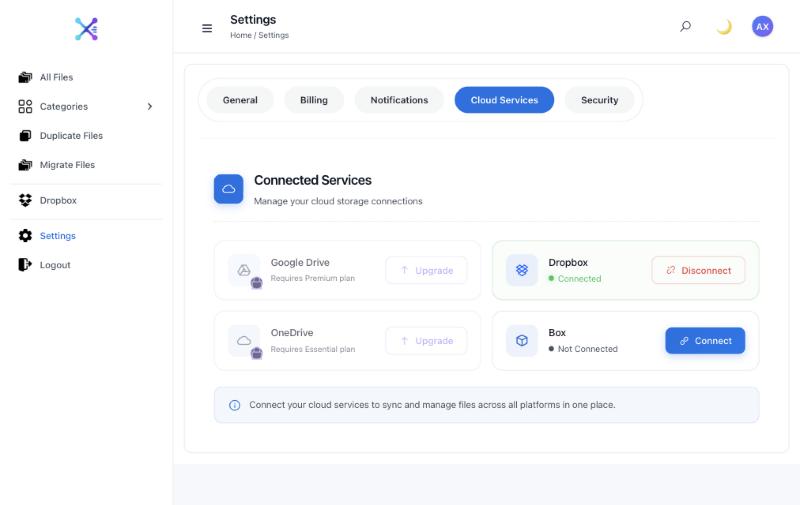
- Connect Google Drive. Sign up at app.axclaim.com, open Settings, then Cloud Services, and connect Google Drive. Google Drive is part of the Premium plan.
- Let the scan finish. Axclaim reads the name, size and checksum Drive reports for each file. It doesn’t open or download your files.
- Open Duplicate Files. Files with matching checksums are grouped as verified duplicates, even when their names are different. Sort by size to start with the biggest wins.
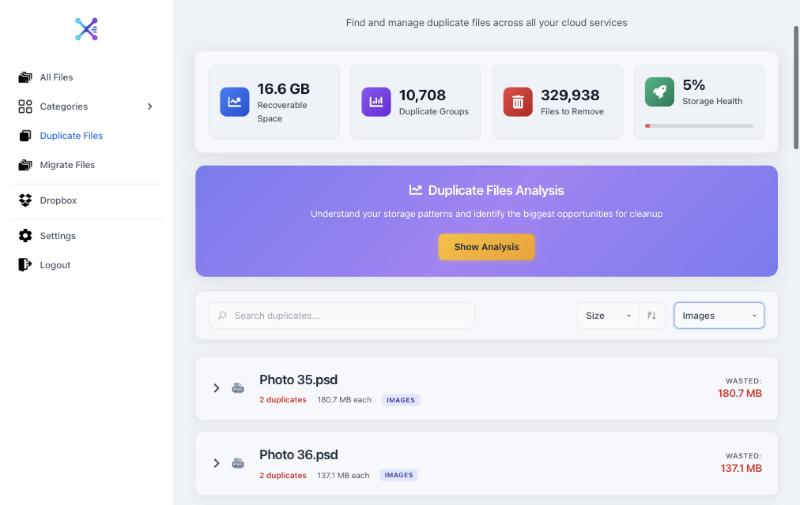
- Delete the extra copies. Tick the copies you don’t need, or click Show Analysis, then Auto-Select Safe Duplicates. Axclaim always keeps at least one copy in each group, and deleted files go to your Google Drive trash.
If you also use Box or Dropbox, Axclaim matches Drive files against them too. Our guide to finding duplicates across cloud storage explains which matches can be confirmed.
Google Docs, Sheets and Slides
Google doesn’t keep a checksum for files created in Docs, Sheets or Slides, so nothing can prove two of them are identical without opening them. Compare them by name, owner and last-modified date, and open both before deleting either.
Getting the space back
- Empty the trash. Files in the Drive trash still count toward your storage. Drive deletes them for good after 30 days, or you can empty the trash yourself once you’ve checked.
- Only your own files count. Copies that someone else owns and shared with you don’t use your storage, so deleting them won’t free any space.
- Give it time. After deleting a lot of files, Google says storage can take up to 48–72 hours to update.
Still short on space after removing duplicates? See Google Drive storage full but no files for the other places your storage goes.
Frequently asked questions
Does Google Drive have a duplicate file finder?
No. Google Drive has no built-in tool for finding duplicates. You can search for common copy names, sort files by size on the Storage page, or use a tool that compares the checksums Drive keeps for each file.
Why do I have duplicate files in Google Drive?
The usual causes are making copies (Drive names them "Copy of …"), uploading a file again and choosing "Keep both files", syncing the same folders from more than one computer, and re-uploading files you downloaded earlier.
Will deleting duplicates free up Google storage?
Only for files you own, and only once they leave the trash. Files in the trash still count toward your storage until you empty it or they're deleted automatically after 30 days. Copies that other people own and shared with you don't use your storage at all.
Can I find duplicate Google Docs, Sheets and Slides?
Only by name and date. Google doesn't keep a checksum for files made in Docs, Sheets or Slides, so no tool can confirm two of them are identical without opening them.
Find the duplicates in your Google Drive
Connect Google Drive on the Premium plan and Axclaim groups identical files by checksum, even when they have different names. You can also start free with Dropbox and Box.