
The short answer
- No service lets you pool storage from Google Drive, Dropbox, OneDrive and Box into one drive, and Google doesn't merge two Google accounts either.
- You have two real options. Keep every account and manage them from one place, or move everything into one account and close the rest.
- The free plans add up to 32 GB (15 on Google, 10 on Box, 5 on OneDrive, 2 on Dropbox), so keeping several accounts can be the cheaper choice.
- Either way, clear duplicates first so you don't pay to store the same files twice.
Most people end up with more than one cloud account without ever deciding to. Google Drive came with Gmail, OneDrive came with Windows, Dropbox came with an old phone, and work uses Box. A few years later, nobody remembers which file is where.
There’s no way to pour all of that into one drive. But there are two good ways to make it feel like one, and which is right depends on how much you store and what you pay.
Why you can’t simply merge them
Each service keeps its own storage, its own files and its own sharing. None of them can borrow space from another, and none can display another service’s files as if they were its own. Google doesn’t even merge two Google accounts.
So “combining” means one of two things:
- One view: keep every account and use something that shows all of them together.
- One home: move everything into a single account and stop using the others.
Option 1: Keep your accounts and get one view
This makes sense when free space matters or each account has a job (work files in Box, family photos in Google Photos, and so on). The free plans add up to 32 GB:
| Service | Free storage | Note |
|---|---|---|
| 15 GB | Shared with Gmail and Google Photos | |
| Box | 10 GB | |
| OneDrive | 5 GB | |
| Dropbox | 2 GB | Shared folders you join count toward it |
With the desktop apps
Install each service’s desktop app (Google Drive for desktop, Dropbox, OneDrive and Box Drive) and you get a folder for each in Finder or File Explorer. That puts everything one click apart on your computer. But the services still don’t know about each other, so search only works within each folder, and copies spread across services stay invisible.
With a tool that connects to all of them
Axclaim connects to Google Drive, Dropbox, OneDrive and Box (one account each) and shows all your files together, sorted into categories like documents, images and videos.
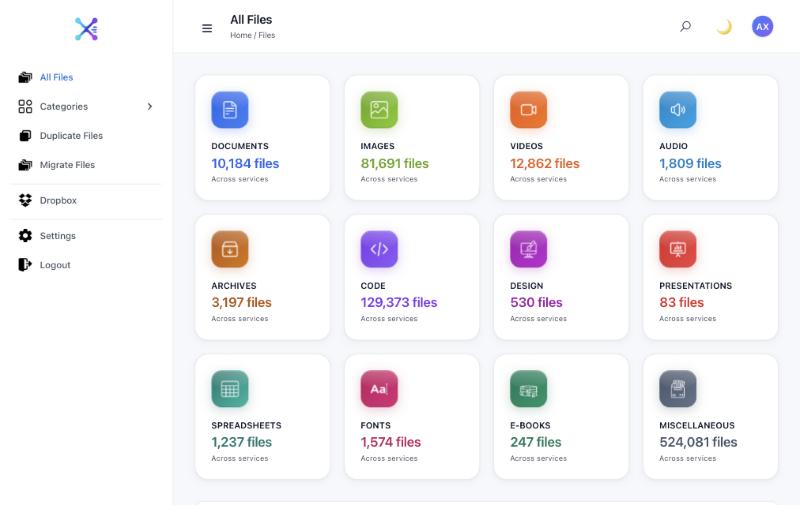
From there you can find duplicates across services and copy files from one to another. Axclaim reads file details (names, sizes and the checksums your services report) to build this view. Your files stay where they are.
The free plan connects Dropbox and Box. Essential adds OneDrive and Premium adds Google Drive.
Option 2: Move everything into one account
This makes sense when you already pay for one service, or when keeping track of several accounts costs you more time than the extra free space is worth.
- Pick the destination. Usually the one you already pay for, or the one your other apps work with best.
- Clear duplicates first. Files often exist in two or three services already. Removing the extra copies before you move means you don’t pay to store them twice. Our guide to finding duplicates across cloud storage shows how.
- Move the files. Download and re-upload, copy between the desktop apps, or copy cloud to cloud without downloading. Our guide to moving files between cloud storage services compares the three.
- Check before you close anything. Compare file counts, open a few files of each type, and share again anything people need.
- Downgrade or close the old accounts. Each service deletes the files in a closed account, so this is the last step, not the first.
Which option should you choose?
| One view | One home | |
|---|---|---|
| Cost | Can stay free for up to 32 GB | One subscription once you outgrow the free plan |
| Effort | Connect accounts once | A one-time move, then nothing to juggle |
| Risk | Low, since nothing moves | Files can go missing if the move isn’t checked |
| Best for | People who use different services for different things | People who already pay for one service |
You can also do both: keep the accounts you use daily, consolidate the rest, and use one view to keep an eye on everything.
Frequently asked questions
Can I combine free storage from different cloud services into one drive?
Not into a single storage pool. Each service keeps its own space and its own files. What you can do is see and manage all of them in one place, or move your files into one service.
Can I merge two Google Drive accounts?
Google doesn't merge accounts. To bring the files together, share a folder from one account with the other and copy the files in, or download them from one account and upload them to the other. Axclaim connects one account per service, so it can't merge two Google accounts.
Is it better to use one cloud service or several?
One service is simpler to search and back up. Several services give you more free space and let you use each for what it's good at. If you keep several, use a tool that shows all of them together so files don't get lost or duplicated.
What happens to my files if I close an account?
Each service deletes the files in a closed account, so move or download everything you want to keep first, and check the copies before you close it.
See all your cloud storage in one place
Connect Dropbox and Box for free, add OneDrive and Google Drive on a paid plan, and see every file sorted into categories, with duplicates across services grouped together.