
The short answer
- Axclaim is built to clean up the cloud storage you already have. It finds duplicate files across Google Drive, Dropbox, OneDrive and Box, shows every file in one dashboard, and copies files between services without downloading them.
- MultCloud is built for moving data. It transfers, syncs and backs up files across more than 30 services, but it has no duplicate finder; its own Google Drive tutorial points to a separate tool.
- The pricing works differently. Axclaim is a flat subscription ($9.99 or $14.99 a month), while MultCloud charges for the data you transfer (5 GB a month free, then 100 GB for $19.99 a month).
- Clearing duplicates first means less to move and less to store, wherever your files end up.
People usually look for a MultCloud alternative because what they actually have is a mess: the same files spread across Google Drive, Dropbox, OneDrive and Box, storage that keeps filling up, and no single place to see it all. MultCloud is a tool for moving data. Axclaim is built for that mess: it finds what’s duplicated, shows everything in one place, and moves what you choose.
What Axclaim does differently
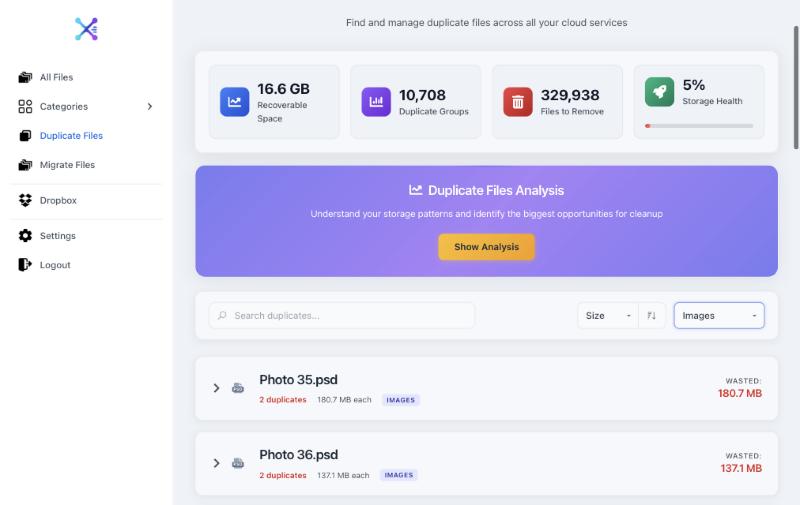
- It finds duplicates across all four services. Axclaim reads the checksums Google Drive, Dropbox, OneDrive and Box already keep for your files, so identical files are grouped even when their names are different. Where two services share a checksum, matches are marked as verified. Otherwise, files with the same name and size are shown as possible matches, so you can check them first.
- It shows every file in one dashboard, sorted into categories like documents, images and videos, whichever service they’re in.
- It copies files between services without downloading them, so nothing passes through your computer.
- Deleting is safe. Axclaim always keeps at least one copy in each duplicate group, and deleted files go to each service’s own trash, where you can restore them.
Axclaim vs MultCloud at a glance
| Axclaim | MultCloud | |
|---|---|---|
| Built for | Cleaning up and organizing your cloud storage | Moving, syncing and backing up data between clouds |
| Finds duplicate files | Yes, within and across all four services | No |
| Services | Google Drive, Dropbox, OneDrive and Box | More than 30, including MEGA, iCloud Drive, Google Photos, FTP and Amazon S3 |
| All your files in one place | Yes, sorted into categories | Yes |
| Copy between clouds without downloading | Yes, on paid plans | Yes |
| Scheduled sync and backup | No | Yes |
| Accounts per service | One | Several |
| Free plan | Dropbox and Box, with your 10 biggest duplicate groups | 5 GB of transfers a month |
| Paid plans | $9.99/month (Essential) or $14.99/month (Premium); $99 or $149 a year | $19.99/month for 100 GB; $59.99/year for 1,200 GB; unlimited from $119/year |
MultCloud’s prices are from its pricing page on November 1, 2026. Its yearly and lifetime plans were shown as discounted.
How the pricing compares
Axclaim’s plans are priced by what you can do:
- Free: connects Dropbox and Box, shows all your files and your 10 biggest duplicate groups.
- Essential ($9.99 a month or $99 a year): adds OneDrive, unlimited duplicate deletion and copying up to 50 files a month between services.
- Premium ($14.99 a month or $149 a year): adds Google Drive and unlimited copying.
MultCloud’s plans are priced by how much data you transfer, so the cost grows with the size of what you move. On a data-based plan, every duplicate you move is data you pay for. Clearing copies first, in Axclaim, shrinks what you need to move.
What Axclaim doesn’t do
Axclaim focuses on the four biggest services and on cleaning them up, so a few jobs are out of scope:
- Services beyond the big four. Axclaim works with Google Drive, Dropbox, OneDrive and Box only.
- Scheduled sync and backups. Axclaim copies the files you pick when you choose to. It doesn’t keep two clouds in sync.
- Two accounts of the same service. Axclaim connects one account per service, so it can’t move files from one Google Drive account to another.
Try Axclaim
- Sign up free at app.axclaim.com and connect Dropbox and Box.
- Open Duplicate Files to see how much space your copies take up, sorted by size.
- Upgrade when you need more: Essential adds OneDrive and deleting duplicates, Premium adds Google Drive and unlimited copying.
Our guide to finding duplicates across cloud storage explains how Axclaim matches files between services, and our cloud storage price comparison shows what each service charges once you outgrow its free plan.
How we checked
MultCloud’s features and supported services come from its homepage, and its prices from its pricing page, both checked on November 1, 2026. MultCloud’s own Google Drive duplicates tutorial points readers to a separate tool for finding duplicates.
Frequently asked questions
Does MultCloud find duplicate files?
No. MultCloud's site lists cloud transfer, sync, backup, email migration and a file explorer, but no duplicate finder, and its own tutorial on Google Drive duplicates points to a separate tool. Axclaim groups identical files within and across Google Drive, Dropbox, OneDrive and Box.
Is there a free alternative to MultCloud?
Axclaim has a free plan that connects Dropbox and Box, shows all your files in one dashboard and shows your 10 biggest duplicate groups. Deleting duplicates and copying files between services are on the paid plans.
How much does MultCloud cost?
MultCloud charges by data transferred. The free plan includes 5 GB a month, and paid plans start at $19.99 a month for 100 GB or $59.99 a year for 1,200 GB. Unlimited plans are $119 a year or $249 for life. The yearly and lifetime prices were shown as discounted on MultCloud's pricing page on November 1, 2026.
Can Axclaim move files between two accounts of the same service?
No. Axclaim connects one account for each of Google Drive, Dropbox, OneDrive and Box, and copies files between different services.
See what's duplicated across your clouds
Connect Dropbox and Box for free to see every file in one place and your 10 biggest duplicate groups. Add OneDrive and Google Drive on a paid plan.