
The short answer
- OneDrive doesn't have a built-in duplicate finder, so copies pile up unnoticed.
- Axclaim reads the hash OneDrive keeps for every file and groups identical files, even when their names are different. Connect OneDrive on the Essential plan.
- Searching by hand catches some copies, but only the ones you already suspect, and it can't tell you two files are identical.
- Deleted files stay in the OneDrive recycle bin and count toward your storage until it's emptied or 30 days pass.
OneDrive’s free 5 GB is shared with your Outlook.com attachments, so it fills up quickly, and duplicates are some of the easiest space to win back. OneDrive has no duplicate finder, though. Here’s how to find every copy and clear them out.
Where duplicates in OneDrive come from
- Photos backed up twice. Turning on camera backup in OneDrive and in another app, or uploading photos that were already backed up, leaves two copies of each.
- Copies with your computer’s name. Microsoft says the OneDrive app creates copies like book1-desktop-computer.xlsx when it has trouble with your sign-in.
- Editing in two places at once. If the same file changes on two devices before they sync, OneDrive keeps both versions.
- Uploading files again. Saving the same email attachment twice, or uploading a folder that’s already in OneDrive after you set up a new computer.
Find every duplicate with Axclaim
For every file, OneDrive keeps a hash: a short code calculated from the file’s contents. Identical files always have identical hashes, whatever they’re called. Axclaim reads these hashes, so it finds true duplicates across your whole OneDrive without downloading anything.
- Connect OneDrive. Sign up at app.axclaim.com, open Settings, then Cloud Services, and connect OneDrive. OneDrive is part of the Essential and Premium plans.
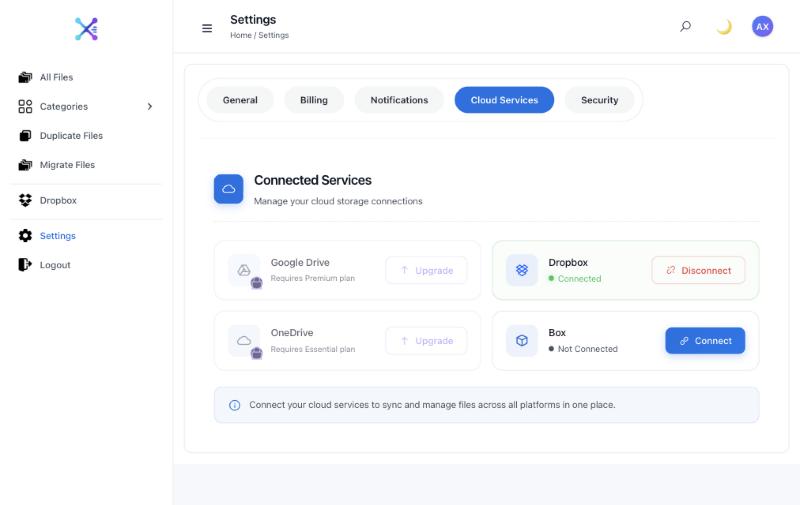
- Let the scan finish. Axclaim reads the name, size and hash OneDrive reports for each file. It doesn’t open or download your files.
- Open Duplicate Files. Files with matching hashes are grouped as verified duplicates, even when their names are different. Sort by size to start with the biggest wins.
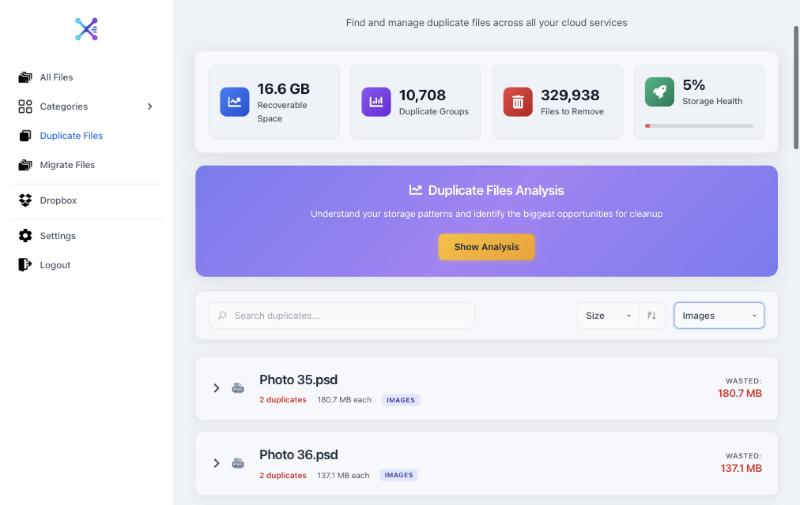
- Delete the extra copies. Tick the copies you don’t need, or click Show Analysis, then Auto-Select Safe Duplicates. Axclaim always keeps at least one copy in each group, and deleted files go to your OneDrive recycle bin.
- Empty the recycle bin to get the space back (see below).
If you also use Dropbox, Box or Google Drive, Axclaim compares your OneDrive files with those too and lists files with the same name and size, so you can spot copies you’ve kept in two places. Our guide to finding duplicates across cloud storage explains how matches work.
Other ways to look
You can also hunt for copies by hand. It’s free, but it only finds the duplicates you already suspect, and you have to open files to be sure they match.
- Your largest files. Microsoft lists your biggest files at onedrive.live.com/?qt=largestfiles. Copies of the same file have the same size, so they tend to sit next to each other.
- Search. Search OneDrive on the web for a file name, or for your computer’s name to find the copies the OneDrive app made during sign-in trouble.
- A desktop duplicate finder. If you use the OneDrive app, a desktop tool can scan your OneDrive folder. OneDrive downloads every online-only file as it’s scanned, so you need the disk space, and anything you delete there is deleted from OneDrive too.
Getting the space back
- Empty the OneDrive recycle bin. It counts toward your storage. Open it at onedrive.live.com/?id=root&qt=recyclebin and empty it once you’ve checked what’s in it. Emptying your computer’s Recycle Bin doesn’t do this. On a personal account, OneDrive deletes recycle bin items for good after 30 days anyway.
- Give it time. Microsoft says your storage can take up to 24 hours to update.
- Check Outlook.com too. Your free 5 GB also covers Outlook.com attachments. If you go over it, Microsoft says you can’t upload or sync to OneDrive, you can’t send or receive email in Outlook.com, and after six months your OneDrive files may be deleted.
- Compare before you upgrade. If you still need more room, Microsoft 365 Basic adds 100 GB for $19.99 a year. See how OneDrive’s plans compare with Google Drive, Dropbox and Box per TB.
On a work or school account, deleted files follow your organization’s rules, so check with your IT team before deleting anything shared.
Frequently asked questions
Does OneDrive have a duplicate file finder?
No. OneDrive has no built-in tool for finding duplicates. Axclaim fills the gap by comparing the hashes OneDrive keeps for each file, so it groups identical copies even when their names are different.
Why does OneDrive make copies with my computer's name in the file name?
Microsoft says these copies appear when the OneDrive app has trouble with your saved sign-in. Its fix is to remove OneDrive's cached credentials (in Credential Manager on Windows or Keychain Access on a Mac) and restart OneDrive. Once the app syncs normally, keep the version you want and delete the other.
Will deleting duplicates free up OneDrive space?
Only once they leave the recycle bin. Items in the OneDrive recycle bin count toward your storage until you empty it or they're deleted automatically after 30 days. Microsoft says storage can then take up to 24 hours to update.
Can I find duplicate photos in OneDrive?
Yes, exact copies. Axclaim finds the same photo backed up twice, even under different names. Edited, resized or re-saved versions are different files, so they aren't grouped as duplicates.
Find the duplicates in your OneDrive
Connect OneDrive on the Essential plan and Axclaim groups identical files by hash, even when they have different names. You can also start free with Dropbox and Box.